Pages

Sunday, December 7, 2014

Waning gibbous, December 7, 2014

Clouds covered the Moon most of the time since December 4. We finally had some visibility the night of December 6, but by then the Full Moon had already been and gone. When I finally took these photos in the early morning hours of December 7, clouds were racing across the face of the Moon.

3:47 AM. High shutter speed, contrast and brightness enhanced, unsharp masking applied. Wispy, fast-moving clouds creating dimness in lower right.

3:48 AM, standard automatic settings. Brightness diminished, contrast enhanced, unsharp masking applied.

Thursday, December 4, 2014

Waxing gibbous, December 4, 2014

The weather has been unsettled lately, with snow and rain and lots of clouds. Photographing the Moon has been a hit-or-miss operation. Last night the moon was Waxing Gibbous, nearly Full, and I saw a chance during breaks in the clouds, so I took it.  

The Moon in context. Note Orion shrouded in clouds, emerging over the house. December 4, 2014, 10:27 PM.

Automatic settings, December 4, 2014, 10:29 PM. Unsharp masking applied to bring out detail.

High shutter speed settings, brightness and contrast manually adjusted, unsharp masking applied. December 4, 2014, 10:31 PM.

Saturday, November 29, 2014

Waxing crescent, November 28, 2014

The evening of November 28, 2014 started out clear and cold. I was heading out to Scranton to take part in the Kick Out the Bottom Open Voice reading, but first I wanted to grab some images of the Waxing Crescent (nearly First Quarter) Moon. I set up the tripod and took a few images. 

Waxing crescent, November 28, 2014, 6:07 PM. Unsharp masking applied.

Waxing crescent, November 28, 2014, 6:07 PM. 60 frames per second, sharpness and contrast enhanced.
A few hours later, when I got home from Scranton, things had changed quite a bit. The Moon, of course, had sunk lower in the West, but now the sky was full of wispy clouds. The Moon had also moved into the neighborhood of smoke from chimneys (mostly from natural gas furnaces) and was dangerously close to some power lines and branches.

9:49 PM, November 28, 2014. Thomas Kinkade painted the Moon too low.
I took a shot at capturing the Moon, hoping to see how the terminator had advanced in the last three and a half hours. Unfortunately, the haze made it difficult to see much detail.

Waxing crescent, 9:51 PM, November 28, 2014. Shot through clouds.

Waxing crescent, 9:51 PM, November 28, 2014. Same image as previous, but with unsharp masking applied. It doesn't help, much.

Thursday, November 27, 2014

Sunday, November 2, 2014

Sharpening the Moon

It's been pretty cloudy for the past few weeks, and getting decent Moon photos has been difficult at best. I had a productive night on Sunday, November 2, and these photos are from that session. They're variations on one image taken at 10:48 PM and another taken at 10:50 PM.

I wanted to explore the ways of sharpening images of the Moon. I've noticed some photographers at the Facebook group SHOOT THE MOON routinely get sharp, crisp images with stunning detail. How do they do that.? I pondered this for a while and then a term came back to to me from many years ago: unsharp masking.

Unsharp masking is a technique which...well, as best I understand it, it brings out details in your images by sharpening edge contrasts or something. I read about it in an astronomy magazine fifteen years or so ago. The article covered some ways to do it manually, involving stacked images with some slightly out-of-focus or overexposed or something. It also talked about techniques for manually developing photos using an unsharp mask - this was back when astrophotography often meant you were developing your own photos in your own darkroom. Now, it means you found the "Unsharp Mask" button on your free photo development software.

One of the problems with photographing the Moon is that it is so bright. This tends to overwhelm the imager, especially when the Moon is between one and three weeks old, and can create soft images that almost seem washed-out.

Waxing gibbous Moon, November 2, 2014, 10:48 PM

The Unsharp Mask feature on the GIMP software I use recommends decomposing the image into HSV format, applying the unsharp mask, and then recomposing the image. I have no idea what those words mean, but I followed the onscreen instructions (available by hitting the F1 key while hovering over the Unsharp Mask button) and the result was a subtle but detectable improvement in the image.

Unsharp mask applied per instructions
But I had had more dramatic results last night when I was playing with this. At that time I wasn't following the directions, just winging it. I decided to try winging it again, and got a more dramatic but very artificial-looking result.

Unsharp mask: winging it
Some time ago I developed my own technique for getting sharper images of the Moon when it's close to Full. I discovered the Manual setting on my camera, and through monkeying with the settings I discovered one that takes 60 images per second at a lower resolution. These images are dimmer but much less washed-out, so I can process them to bring out detail that would otherwise be lost.

High shutter speed image, November 2, 2014, 10:50 PM.
The first step in improving this image is to brighten in. How much brightening is needed depends on how bright the original image was. In this case, I brightened it by 95 somethings. (I have no idea what.)

Brightness increased by 95.
I followed this by cranking up the contrast. Through trial and error, I decided that the appropriate contrast increase would be 85 somethings. So that's where it is.

Brightness increased by 95, contrast enhanced by 85. Looks pretty good.
So there you have it: two ways of improving the appearance of the Moon. I will continue to learn the unsharp mask method, but I'm happy with my brightness and contrast enhancement technique.

Thursday, October 9, 2014

Wednesday, October 8, 2014

Lunar eclipse at sunrise, October 8, 2014


Eclipsed Moon setting in totality, photographed from the Nanticoke-West Nanticoke bridge over the Susquehanna river, Nanticoke, PA.

A full account of my experience of this eclipse can be found here.

Saturday, October 4, 2014

Waxing gibbous, October 4, 2014

Two views of the Waxing gibbous Moon. The first was taken at 10:22 PM in "Sports" mode, which uses a high shutter speed to capture fast motion - or cut down on the effect of any microscopic vibrations in the tripod. The second was taken at 10:24 PM in a manual mode that takes a lower-resolution image at 60 frames per second. This results in a dimmer image but has the effect of filtering out the glare of reflected sunlight. Adjusting the brightness and contrast results in an image that brings out fine details of the Moon's surface otherwise lost in the glare.


Wednesday, October 1, 2014

First quarter and clouds, October 1, 2014

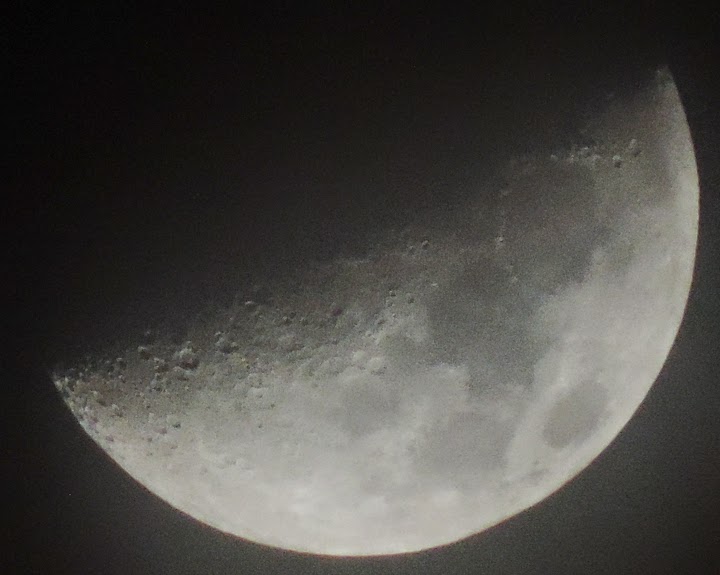
Wednesday, October 1 was the First Quarter point, the day the the Moon appears lit up on its Western-facing half. It was also just the second day of this lunar cycle that wasn't completely clouded out - for a little while.


The Moon seemed unusually bright, and the camera had a hard time adjusting to it. Tripod shot at 42x magnification. Image taken at 8:19 PM, shortly before the Moon vanished entirely - see below.


I used my standard trick for teasing out detail when the Moon is so bright: I took images at 60 frames per second and enhanced them. This mode takes sixty lower-resolution shots in a row, and the images are usually so dim that, except at Full Moon, some enhancement is needed. I crank up the brightness and the contrast to manipulate the data in the image so that things that are washed-out in regular images become visible. This results in an eerie view of the Moon under lighting conditions that we never experience in real life, showing craters and rays and highlands that are not visible in a typical image. Taken at 8:12 PM.


A huge, thick cloud bank rolls to cover the Moon at 8:15 PM. In a few minutes, this brought the evening's photography to an end, and I was able to resume my garbage night duties. Note the teapot of Sagittarius directly below the Moon.